


您可以在应用程序中捕获用户输入事件。为此,您可以实现一个功能块,在用户事件发生时执行该功能块。
捕捉变量的写入
当用户(在输入框中)完成数值输入后,编辑控件事件就会关闭。您可以在应用程序中捕获该事件,具体方法如下。
-
创建一个功能块,实现
VisuElemBase库中的VisuElems.IEditBoxInputHandler接口。 -
通过调用
SetEditBoxEventHandler方法,将实例传递给全局事件管理器VisuElems.Visu_Globals.g_VisuEventManager。
示例
可视化有两个输入字段,分别用于iInput_A 和rInput_B ,还有一个文本输出元素。
输入字段是矩形,用户在输入文本时会被提示点击。
文本输出元素是一个矩形,在这里打印文本变量PLC_PRG.stInfo 的内容。文本变量包含用户在某个输入字段中的最后一次输入以及添加的附加信息。
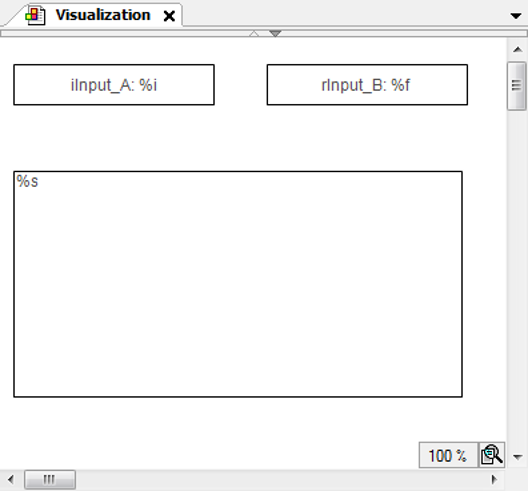
|
矩形的属性 |
|
|
“文本 文本” |
|
|
“文本变量 文本变量” |
PLC_PRG.iInput_A |
|
矩形的属性 |
|
|
“文本 文本” |
|
|
“文本变量 文本变量” |
PLC_PRG.rInput_B |
|
文本输出矩形的属性 |
|
|
“文本 文本” |
|
|
“文本变量 文本变量” |
PLC_PRG.stInfo |
PLC_PRG 执行
PROGRAM PLC_PRG
VAR_INPUT
	iInput_A:INT;  (* Used in the visualization as user input variable*)
	rInput_B:REAL; (* Used in the visualization as user input variable*)
	stInfo : STRING;  (* Informs about the user input via the edit control field;
		String gets composed by method 'VariableWritten;
		Result is displayed in the lower rectangle of the visualization *)
END_VAR
VAR
	inst : POU;
	bFirst : BOOL := TRUE;
END_VAR

IF bFirst THEN
	bFirst := FALSE;
	VisuElems.Visu_Globals.g_VisuEventManager.SetEditBoxEventHandler(inst);
	(* Call of method VariableWritten *)
END_IF
POU 执行
FUNCTION_BLOCK POU IMPLEMENTS VisuElems.IEditBoxInputHandler
(* no further declarations, no implementation code *)
方法VariableWritten 分配给 POU
METHOD VariableWritten : BOOL
(* provides some information always when an edit control field is closed in the visualization, that is a variable gets written by user input in one of the upper rectangles *)
VAR_INPUT
	pVar : POINTER TO BYTE;
	varType : VisuElems.Visu_Types;
	iMaxSize : INT;
	pClient : POINTER TO VisuElems.VisuStructClientData;
END_VAR

// String stInfo, which will be displayed in the lower rectangle, is composed here
PLC_PRG.stInfo := 'Variable written; type: ';
PLC_PRG.stInfo := CONCAT(PLC_PRG.stInfo, INT_TO_STRING(varType));
PLC_PRG.stInfo := CONCAT(PLC_PRG.stInfo, ', adr: ');
PLC_PRG.stInfo := CONCAT(PLC_PRG.stInfo, DWORD_TO_STRING(pVar));
PLC_PRG.stInfo := CONCAT(PLC_PRG.stInfo, ', by: ');
PLC_PRG.stInfo := CONCAT(PLC_PRG.stInfo, SEL(pClient^.globaldata.clienttype = VisuElems.Visu_ClientType.Targetvisualization,'other visu', 'targetvisu'));
捕捉键盘事件
当用户按下和松开按键时,可视化界面中就会触发一个键盘事件。您可以在应用程序中捕获该事件,具体方法如下。
-
创建一个功能块,实现
VisuElemBase库中的VisuElems.IVisuUserEventManager。 -
通过调用
VisuElems.Visu_Globals.g_VisuEventManager方法,将实例传递给全局事件管理器SetKeyEventHandler。
示例
可视化有一个文本输出元素。文本输出元素是一个矩形,在这里打印文本变量PLC_PRG.stInfo 的内容。文本变量包含用户最后一次按键的信息。
|
文本输出矩形的属性 |
|
|
“文本 文本” |
|
|
“文本变量 文本变量” |
PLC_PRG.stInfo |
实施PLC_PRG 计划
PROGRAM PLC_PRG
VAR_INPUT
	stInfo : STRING;
END_VAR
VAR
	inst : POU;
	bFirst : BOOL := TRUE;
END_VAR

IF bFirst THEN
	bFirst := FALSE;
	VisuElems.Visu_Globals.g_VisuEventManager.SetKeyEventHandler(inst);
END_IF
POU 功能块的实现
FUNCTION_BLOCK POU IMPLEMENTS VisuElems.IKeyEventHandler
(* no further declarations, no implementation code *)
实现VariableWritten 方法的POU 功能块
/// This method will be called after a key event is released.
/// RETURN:
/// TRUE - When the handler has handled this event and it should not be handled by someone else
/// FALSE - When the event is not handled by this handler
METHOD HandleKeyEvent : BOOL
VAR_INPUT
	/// Event type. The value is true if a key-up event was released.
	bKeyUpEvent : BOOL;
	/// Key code
	dwKey : DWORD;
	/// Modifier. Possible values:
	/// VISU_KEYMOD_SHIFT : DWORD := 1;
	/// VISU_KEYMOD_ALT : DWORD := 2;
	/// VISU_KEYMOD_CTRL : DWORD := 4;
	dwModifiers : DWORD;
	/// Pointer to the client structure were the event was released
	pClient : POINTER TO VisuStructClientData;
END_VAR
VAR
END_VAR

PLC_PRG.stInfo := 'KeyEvent up: ';
PLC_PRG.stInfo := CONCAT(PLC_PRG.stInfo, BOOL_TO_STRING(bKeyUpEvent));
PLC_PRG.stInfo := CONCAT(PLC_PRG.stInfo, ', key: ');
PLC_PRG.stInfo := CONCAT(PLC_PRG.stInfo, DWORD_TO_STRING(dwKey));
PLC_PRG.stInfo := CONCAT(PLC_PRG.stInfo, ', modifier: ');
PLC_PRG.stInfo := CONCAT(PLC_PRG.stInfo, DWORD_TO_STRING(dwModifiers));
PLC_PRG.stInfo := CONCAT(PLC_PRG.stInfo, ', by: ');
PLC_PRG.stInfo := CONCAT(PLC_PRG.stInfo, SEL(pClient^.globaldata.clienttype =
                                             VisuElems.Visu_ClientType.Targetvisualization,
																																													'other visu', 'targetvisu'));
记录输入事件触发的变量值变化
所有通过用户输入改变变量值的可视化元素都会调用IValueChangedListener 界面。通过该界面,可以记录数值变化,然后以编程方式进行处理。
-
执行一个实现
IValueChangedListener接口的功能块(例如:POU)。FUNCTION_BLOCK POU IMPLEMENTS VisuElems.IValueChangedListener在设备树中,功能块下方插入了“ValueChanged” 方法。
-
在程序中(例如:“PLC_PRG” ),实现注册接口的 IEC 代码。
VisuElems.g_itfValueChangedListenerManager.AddValueChangedListener(itfValueChangedListener)“PLC_PRG” 通过“ValueChanged” 方法接收所有值变化。
现在,您可以记录和处理数值变化。